
Map Customer Work
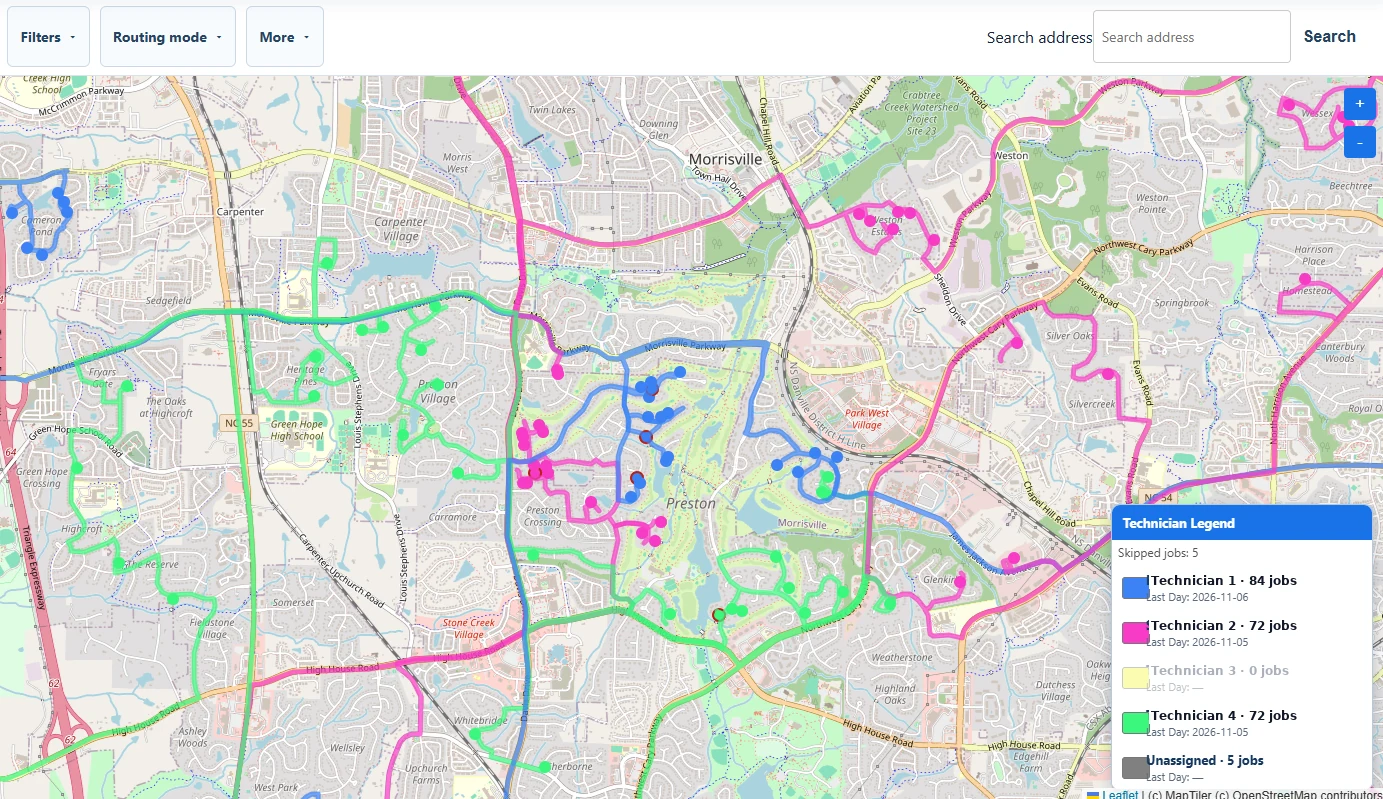
Import customer and job data, geocode it, and see every service location on the map.

Available
Map customer jobs, organize work geographically, build efficient routes, and assign technicians without hours of manual scheduling work.
What it does
Import customer and job data, geocode it, and see every service location on the map.
Organize customers and service locations, then assign the work to technicians and dates.
Auto Schedule jobs instead of building every schedule by hand.
Review routes and the calendar, then export or push complete service-address information to your CRM or workflow.
How it works
Import → Organize → Route → Assign → Schedule → Confirm / Dispatch

A short tour of Systemize Your Routes from the dispatcher’s point of view.
More walkthroughs
Focused walkthrough videos are on the way.
Bringing in customer and job data and seeing it on the map.
Scheduling jobs with Auto Schedule.
Checking routes and the calendar before the work goes out.
Sending complete service-address information on to your CRM or workflow.
Who it is for
Dispatchers and service businesses that organize customer work across technicians, dates, and territories.
Routes is used in the office to plan and organize the work. It is not an in-vehicle navigation app; technicians keep using their CRM or phone maps for driving.
Get started
Request access and a member of the Systemize Your team will follow up to learn about your dispatch workflow.
A request does not create an account, activate a subscription, or process payment.